Getting Started
We appreciate your feedback on our new Helmholtz Matrix Service and this Documentation!
- Please contact us if you encounter any errors.
- Helmholtz members are also invited to give us some structured feedback here.
Since end of March 2026 the Helmholtz Chat Service, based on Matrix can be used free-of-charge by anybody within Helmholtz, including their invited partners. The main instance is hosted by HIFIS on HZDR servers and federates with other instances within Helmholtz and worldwide.
Our Policies and Helmholtz Cloud Terms of Use apply.
First Steps for New Users
1. Login
- If you are from DLR, KIT, CISPA, FZJ, GFZ, GWDG, TU Dresden: Use the respective linked center matrix instances.
- If you are from HZB: See the HZB Matrix intranet page.
- If you are any other Helmholtz member:
- Open https://matrix.helmholtz.cloud in your browser
(Later you can also use the Element app. Check here for app configuration.) - Log in with your Helmholtz ID.
- Open https://matrix.helmholtz.cloud in your browser
- You have no institutional ID? Create an ID with a public provider, e.g.:
- Alternatively, ask your Helmholtz contact to invite you to a Group (Virtual Organization). Then log in like any other Helmholtz member.
In any case — Don’t mix private accounts with institutional duties. Group admins decide if private accounts may join.
2. Most Important: Save Your Recovery Key at Once!
Matrix provides strong security and encrypted communication by default. Losing the recovery key means you cannot recover chat history, even the provider cannot help.
Be aware:
Save your recovery key immediately. If you don’t, you will lose all chats sooner rather than later.
- After first login, save the recovery key / “Wiederherstellungsschlüssel” in a secure place (e.g., password manager).
Click your avatar → All Settings → Encryption. - When prompted, verify your session with the recovery key or another open session.
3. Do Not Log Out, Keep Your Session
- Stay logged in – just close the window/tab/app. Your verified session stays active so you can receive encrypted messages overnight.
- Inactive sessions are closed after 120 days.
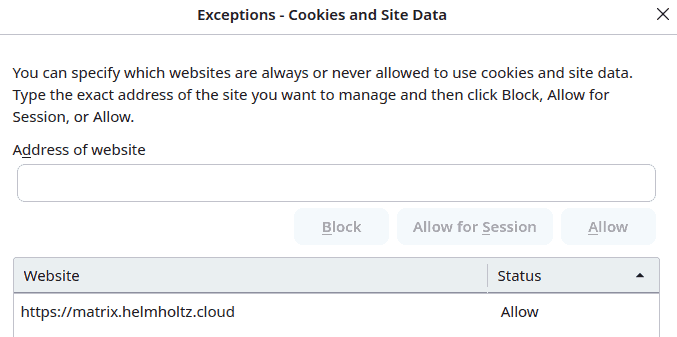
- If you use the browser-based client and clear cookies or browser storage regularly, add
matrix.helmholtz.cloudas an exception (e.g., Firefox → Settings → Exceptions).
4. Enjoy the Matrix Experience!
More Hints, Infos, Tips & Tricks
- How to configure Element client, if you’re using a an Element app.
- How to create a space and rooms
- How to how to invite users or enter spaces and rooms
- How to work optimally with threads
- Frequently asked questions, e.g. how others can find you, are answered in the FAQ
- Detailed Matrix Doc is provided by TU Dresden DE / EN