


Do You Need to do a Survey? Here are 3 Options for You to Consider
Level 1: Simple Survey using Matrix
Matrix offers a simple way to create a survey using the poll feature.
Example with a question on HIFIS (how it looks when the poll ended)
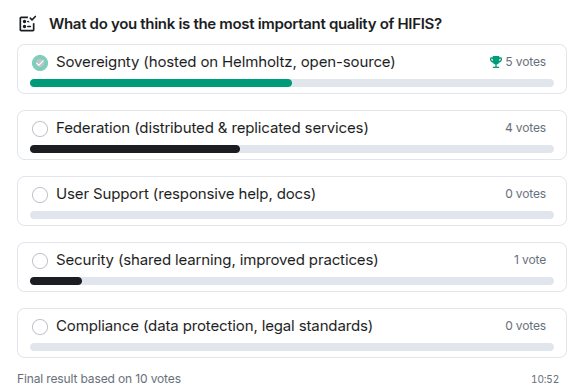
When writing a message, click on ‘Poll’ in the options on the right to create one. You can choose either an open or closed poll. The difference is when the answers will be revealed:
- in an open poll, votes are revealed as soon as they are cast;
- in a closed poll, votes are revealed only when the poll ends.
While no votes have been cast, you can still edit your poll. Convenient if you spot a quick typo.
Poll answers are always anonymous and, for now, single-choice only. Note that respondents can change their vote until the poll ends.
There’s even a level 0 with Matrix, which is using “emoji voting”. You let others react on a message with emojis. This is a quick and easy way to get feedback on a single question with simple answers. You can react to your own message with the expected emojis, so people don’t need to look for them themselves.
Level 2: Doodle-like Survey with DFN-Terminplaner
The DFN TerminPlaner is a tool that allows you to create a simple survey, in particular to schedule meetings. It’s a great option if you’d rather use e-mails. It’s of course not a Helmholtz Cloud service but DFN are friends.
Level 3: LimeSurvey
The more comprehensive option is using LimeSurvey. It’s a powerful online survey tool that allows you to create complex surveys with multiple question types, logic, and branching. With LimeSurvey, you can also generate reports and graphs to help you analyze your results. To get started, the best way is to check the manual.
Find Matrix, LimeSurvey and many other services available to you and your team in the helmholtz.cloud.
Changelog
- 2026-04-29: Replace Mattermost with Matrix